Autofill without trusting the browser.
The browser shell talks to Desktop Gateway on localhost. Secrets stay in the desktop app, not in the browser profile.
Back homeThe extension detects username, password, and OTP fields, but the commands start from the ChromVoid popup. Extension controls are not injected into the form DOM.
Browser-grade UX without turning the browser into the vault.
This page explains why the extension still feels like familiar autofill while refusing to become a second secret store inside the browser profile.
No browser vault
The extension never becomes a second secret store inside the browser profile.
Localhost only
All privileged requests go through the local Desktop Gateway boundary.
Short-lived grants
Authentication actions expire quickly and do not survive lock or revoke.
One request path, one localhost boundary, one policy authority.
Every request takes the same route: page and popup go through the service worker, Desktop Gateway brokers the call, and Core decides whether a short-lived grant can exist.
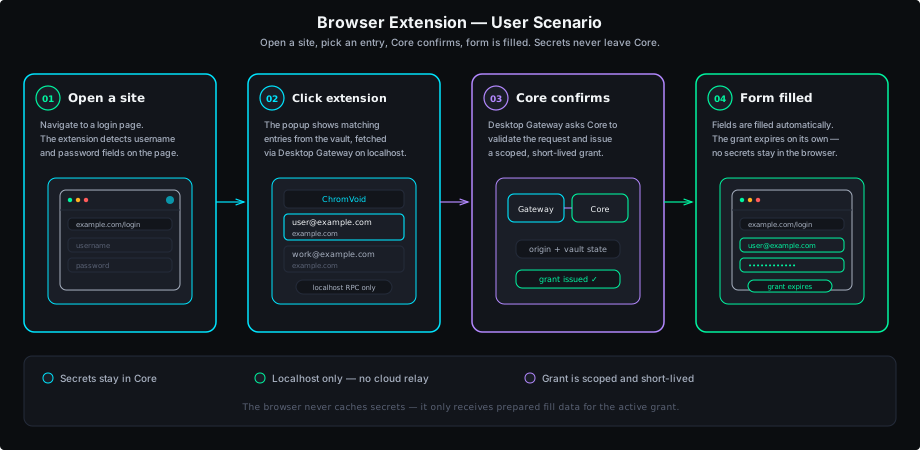
Open the popup
The user starts from the extension popup, not from injected controls inside the form.
Broker through localhost
The request passes through the service worker and Desktop Gateway on 127.0.0.1.
Return a short-lived grant
Core resolves the request and only then fills, copies, or reveals OTP data.
What stays in the browser, and what must stay outside it.
The architecture is explicit by layer. The browser gets interface convenience; Gateway gets brokering; Core keeps the secrets and the policy decisions.
UI boundary
The extension lives inside the browser runtime, so its contract stays narrow: render the interface, send the request, receive the answer.
- Stores only pairing and grant metadata with explicit TTLs.
- Provides popup, autofill, and TOTP without a local browser vault.
- Cannot talk directly to cloud relays, WebRTC, or the phone.
Local broker
Desktop Gateway is the only entry point on `127.0.0.1`. It brokers every service-worker request and prevents the browser from growing a side channel.
- Brokers all extension traffic through localhost.
- Separately checks reachability, authorization, and session state.
- Loses access immediately on lock, revoke, or grant expiry.
Policy and secrets
Core remains the only place where secrets, policy, and grant decisions exist. Even error responses are shaped to avoid proving too much.
- Validates origin, vault state, and user confirmation.
- Issues session, site, or single-action grants.
- Normalizes errors so the browser cannot prove secret existence.
Limits and scope
The page is honest about what the extension does not try to do.
When the extension fits
- It requires the desktop app to be running and reachable on localhost.
- It does not store secrets in extension storage or sync them through the browser profile.
- It is not a general browser password manager replacement.
Use the browser extension with a desktop Core.
The landing demo shows the browser shell, the popup, and the localhost boundary together.