Encrypted files as a normal folder.
Unlock once, work in Finder or Explorer, then unmount to return to an at-rest encrypted view.
Unlock, mount, work, unmount. Four states.
Use mounted storage when a desktop folder is the right mental model for your files.
Locked
Files encrypted at rest. No OS-level app sees the content.
encryptedUnlock
ChromVoid starts a mounted session and picks the backend automatically.
session_activeMounted
A folder appears in Finder / Explorer. Any file app can see it.
visibleUnmount
The decrypted view disappears. Files are encrypted at rest again.
removedNotes and Markdown
Open a vault in Obsidian or another editor as a normal working folder.
Files without export
Edit PDFs, scans, and working documents in place without export or re-import.
Temporary decrypted access
Unmount when the session ends so the visible folder disappears again.
Lifecycle
Mounted Vault is not background sync. It is an explicit session with a deterministic start and end.
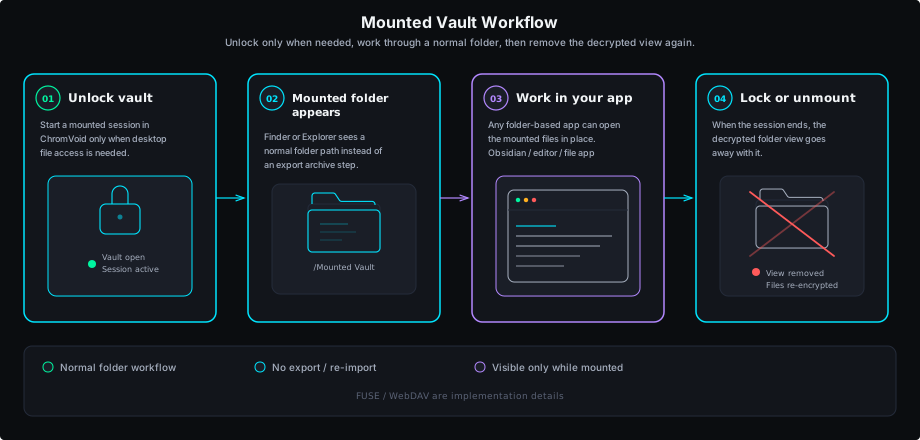
Unlock the vault
Open ChromVoid and start a mounted session.
The folder appears
Finder or Explorer sees a normal path that apps can use immediately.
Work in place
Edit files inside the mounted folder without export loops.
Unmount
Close the session and the decrypted view disappears again.
Access boundary
Explicit mount
Mounted access starts only after a user action.
Visible during session
Files are visible to OS-level file apps only while mounted.
Deterministic fallback backend
FUSE is preferred where available; WebDAV remains the fallback path.
Limits and scope
Only the real prerequisites and public-scope boundaries live here.
- On macOS, FUSE mode depends on a compatible macFUSE stack.
- Obsidian is only a workflow example here, not a first-party integration.
- Mobile volume mount stays outside the current public scope.
Mount the vault when folder-based workflows make sense.
The mounted view is session-bound, then returns to at-rest encryption when you unmount.